Research Summary
Teams are increasingly using AI workers for projects that last longer than a single prompt: development, penetration testing, report review, incident investigation, compliance mapping, architecture design, research, and asynchronous task execution. This presents a real problem: the next worker starts with incomplete history, compressed context, missing decisions, stale assumptions, or a giant prompt that tries to carry months of project state by hand.
That is the wrong operating model.
The durable memory for serious work should live outside the model. A worker should be able to rehydrate from a repository, case folder, issue queue, evidence index, decision log, skill bundle, validation record, or controlled data store before it performs task work. At the end of the work unit, it should update that same substrate so the next worker, model, tool, or team member can continue with the same operating picture.
Current tooling already supports pieces of this pattern. OpenAI documents explicit approaches for conversation state, but those approaches still require state to be managed intentionally rather than assumed.[1] Codex reads AGENTS.md files before work and layers project-specific guidance into the session.[2] Claude Code uses CLAUDE.md and memory files to give the worker project context at startup.[3] GitHub Copilot supports repository instructions, path-specific instructions, and AGENTS.md agent instructions.[4] MCP provides a standard way to connect AI clients to external systems such as files, databases, tools, and workflows.[5] OpenAI Skills and Codex Agent Skills add a stronger reusable-workflow layer by packaging instructions, resources, and optional scripts into versioned bundles.[6][7]
The pattern behind stateful AI workers is straightforward: move memory out of the model and into the work. Use durable project state, reusable skills, prompt snippets where appropriate, validation records, evidence indexes, task queues, decision logs, and hand-off files as the source of truth. Then require each worker to rehydrate before work and checkpoint before exit.
Introduction
Stateful AI workers rarely fail because a project starts over. They fail more quietly than that. A thread still contains months of history, the next response still sounds informed, and the worker still appears to understand the assignment, but part of the operating picture has thinned out. A constraint gets softened. A prior decision disappears into a summary. Evidence and interpretation blur together. The team keeps moving, but the work is now depending on whatever survived the last compaction, export, handoff, or tool switch.
That is where quality starts to drift. Not because the worker has no ability, but because it starts with a thinner version of the work than the prior worker had. The missing piece may be a decision made six weeks ago, a finding that was intentionally downgraded, a report convention, a validation gate, an evidence path, a task boundary, or a client-specific constraint that was present in the original thread but did not survive compaction with enough precision.
The answer is not to make every prompt bigger. Larger prompts eventually become their own source of noise. The answer is to stop treating the chat as the project record.
A human team would not run a penetration test, software project, report review, compliance assessment, incident investigation, or architecture program from one person’s memory. We use repositories, tickets, evidence folders, notes, decision logs, report drafts, review comments, runbooks, and hand-offs because the work has to survive interruptions and changes in personnel. AI workers need the same operating model.
The model does not need to be stateful. The work system needs to be stateful. That is the practical difference between using a model in a long chat and operating stateful AI workers as part of a durable workflow.
A worker should be able to arrive cold, read the project substrate, reconstruct the current operating picture, perform a bounded unit of work, validate the result, update the state, and leave a clean hand-off. The next worker may be the same tool tomorrow, a different model in five minutes, a review worker in another environment, an asynchronous job runner, or another person joining the project.
The durable unit is not the chat. It is the work.
For security teams, this pattern builds naturally on AI-assisted testing and review workflows. We have discussed that broader shift in AI in Penetration Testing: Speeding Up Offense & Shaking Up Security, and the same state discipline applies when AI workers help with evidence-heavy work such as Purple Teaming Compromised Security Tools.
Technical Deep-Dive
1. Define the worker, not the vendor
Stateful AI workers are not limited to coding agents. Coding is only the easiest place to see it because repositories, branches, test commands, and pull requests already provide a visible state substrate.
An AI worker is any model-driven execution context that performs bounded work against an external project state.
| Worker type | Example work |
|---|---|
| Implementation worker | Write code, change configuration, update a report section, complete a task |
| Penetration-testing worker | Rehydrate assessment state, review evidence, update findings, build narrative |
| Report-review worker | Check consistency, quality, formatting, severity, references, and evidence alignment |
| Evidence worker | Index artifacts, normalize paths, summarize raw material, maintain traceability |
| Research worker | Add current public references, verify claims, update citations |
| Review-gate worker | Pass, block, or return work with required remediation |
| Compliance worker | Map evidence to controls, identify gaps, update assessment state |
| Investigation worker | Review logs, preserve timeline, maintain case state |
| Async worker | Pull a task, rehydrate, perform work, checkpoint, exit |
| Team hand-off worker | Produce a restart package for another model or another human |
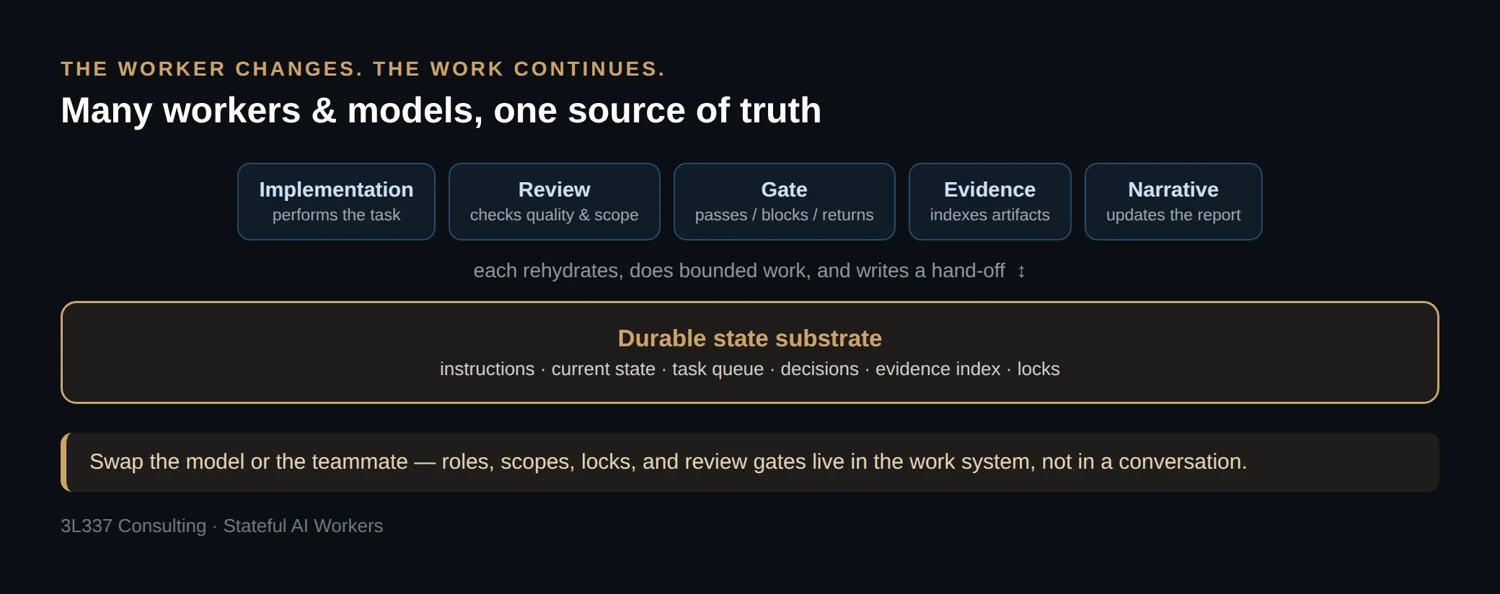
The role matters more than the product. One worker may implement, another may review, another may update evidence, and another may prepare the hand-off. The model can change while the role and the state substrate remain stable.
2. The failure mode: chat as memory
The immature workflow usually starts like this:
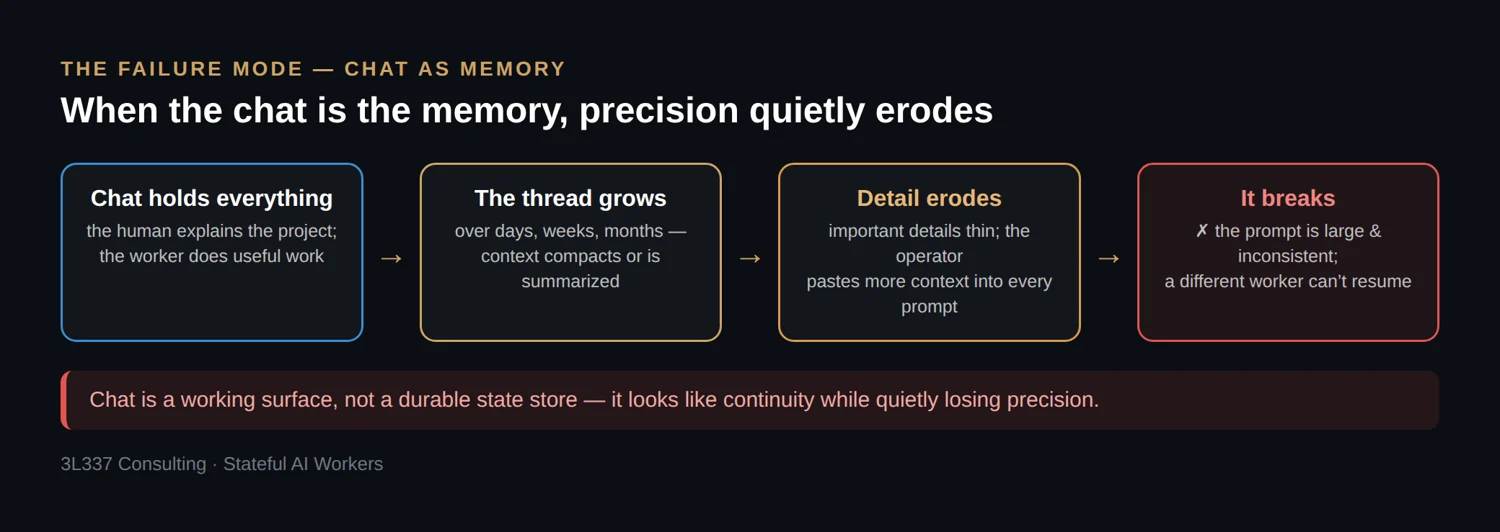
That workflow does not always fail immediately. In fact, it often works well enough early on that teams keep extending it. The failure appears when the thread becomes the hidden source of truth and no one can reliably answer which instructions, decisions, evidence, and constraints are still present in the worker’s active context.
The outcome is not usually “starting from scratch.” The outcome is worse because it looks like continuity while quietly losing precision. The worker continues, but it may continue from a reduced version of the project.
That produces familiar problems:
| Problem | What it looks like in practice |
|---|---|
| Missing history | A worker repeats a rejected approach or ignores a prior decision |
| Reduced context | A compacted summary preserves the goal but loses constraints |
| Prompt bloat | Operators paste large background sections into every request |
| Vendor lock-in pressure | The team avoids switching tools because the active context lives in one product |
| Long-thread fragility | Months of work depend on a conversation no one can cleanly review |
| Team hand-off friction | Another person cannot join without a manual state briefing |
| Review drift | A reviewer cannot tell whether the worker used the current evidence or stale notes |
| Async fragility | A scheduled or background worker lacks enough state to complete safely |
Chat is a working surface. It is not a durable state store.
3. Why stateful AI workers need externalized work state
A mature workflow makes the work carry its own memory.
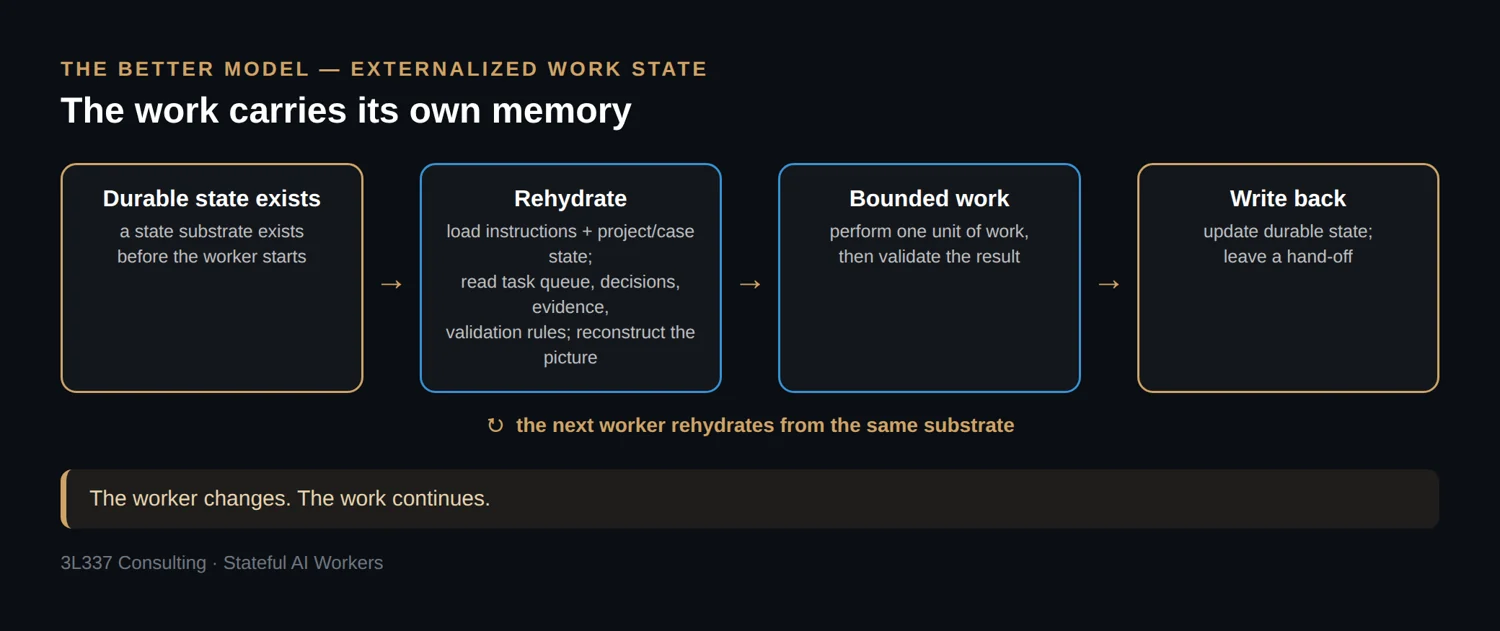
This is the rehydration pattern.
Rehydration is the act of reconstructing working context from durable external state before a worker performs task work. It is not a longer prompt, and it is not a summary pasted from the prior chat. It is a repeatable intake process against the current source of truth.
The pattern separates five things that often get collapsed into one conversation:
| Layer | Purpose |
|---|---|
| Instructions | How the worker should behave |
| State | What happened, what is current, and what remains |
| Evidence | What proves claims or supports decisions |
| Procedure | How recurring work should be performed |
| Hand-off | How another worker or team member resumes |
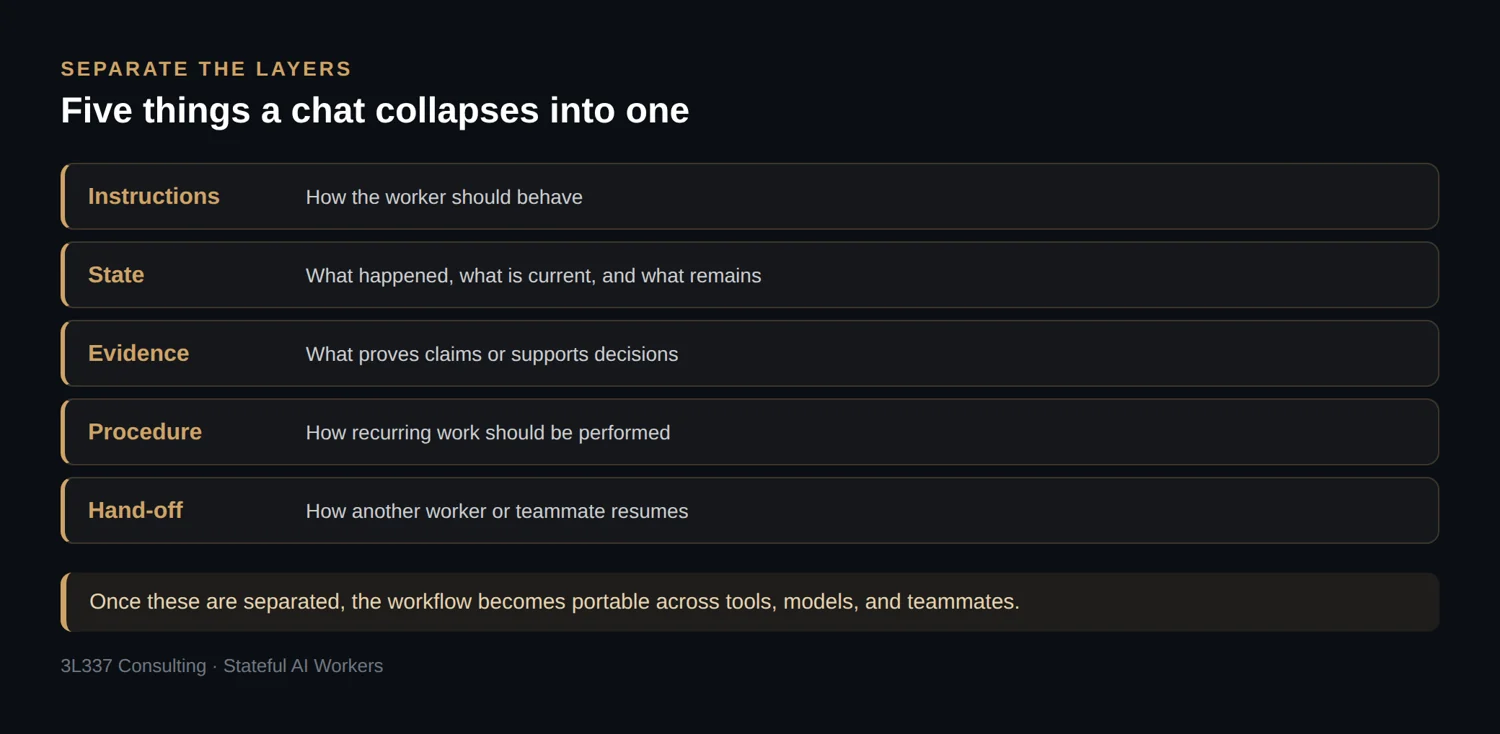
Once those layers are separated, the workflow becomes portable. A CLI worker can operate from the repository. A review worker can operate from a prepared hand-off package. A teammate can inspect the same state files and continue from a different branch. An async worker can pull a task, perform a bounded update, and write a checkpoint. A different model can enter the same workspace and rehydrate without relying on the prior model’s private session.
The worker changes. The work continues.
4. The rehydration loop
The rehydration loop should be explicit enough that a different worker, model, or teammate can run it the same way.
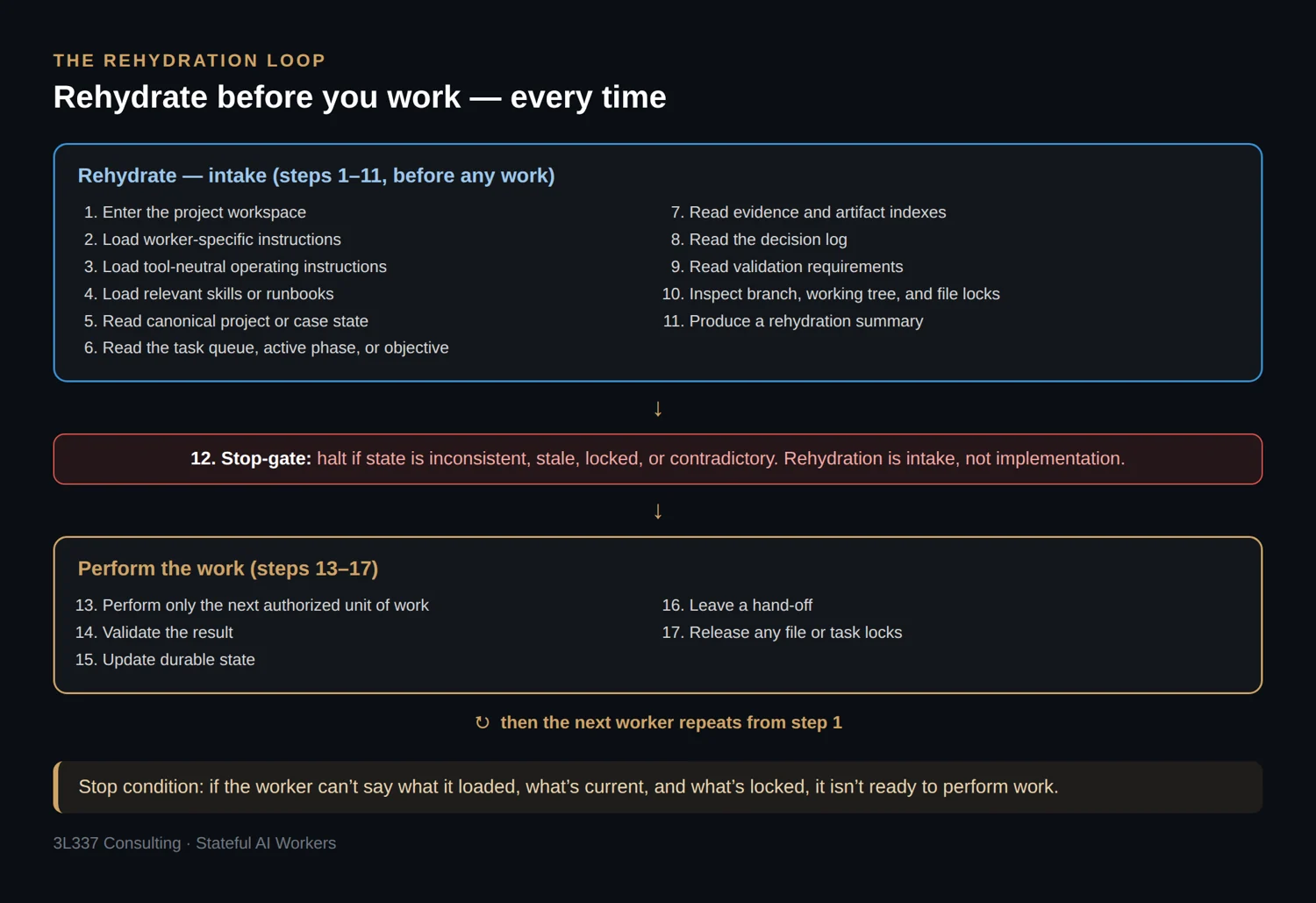
The lock checks are important when multiple people or workers use the same state substrate. Without them, two workers can update the same narrative file, finding register, task queue, or evidence index at the same time and create a conflict that looks clean until later review.
A practical rehydration command can remain short:
rehydrate
But the procedure behind it should be precise:
Rehydrate from this project before doing any work.

Read the operating instructions, applicable skills, current state, task queue, decision log, validation requirements, evidence index, narrative notes, lock status, and latest hand-off.

Return:

| Field | Required output |
|---|---|
| Current objective | What this project or case is trying to accomplish |
| Active workstream | The current phase, task group, or review gate |
| Last completed work | The most recent completed unit |
| Current open task | The next task that appears ready |
| Known blockers | Anything preventing safe progress |
| Active locks | Files, sections, issues, tasks, or artifacts currently locked |
| Relevant evidence | Evidence or artifact references needed for this task |
| Applicable validation | Checks required before completion |
| Files loaded | State files, instruction files, skills, and indexes reviewed |
| State concerns | Contradictions, stale notes, missing files, or unclear ownership |

Do not modify files during rehydration. Stop after the summary.
The stop condition matters. Rehydration is not implementation. It is intake. If the worker cannot say what it loaded, what is current, what is locked, and what may be stale, it is not ready to perform work.
See part of the workflow in action
I recently demonstrated portions of an AI-assisted web application testing harness during a SANS webcast. The demonstration shows how an AI worker can operate against structured penetration-testing state, evidence, and reporting artifacts. This article expands the underlying pattern beyond penetration testing and explains how durable external state supports continuity across workers, models, sessions, and team members.
Watch the SANS recording — registration is required.
5. Minimum viable state substrate
The minimum state substrate does not need to be elaborate. It needs to be durable, reviewable, accessible to authorized workers, and structured enough to separate instructions, state, evidence, procedure, and hand-off.
A small project can start with this:
project-root/
  AGENTS.md
  CLAUDE.md
  README.md

  state/
    current_state.md
    task_queue.md
    decisions.md
    validation.md
    locks.md
    handoff.md
    worker_log.md

  skills/
    state-update/
    review-gate/
    evidence-index/
    report-narrative/

  prompts/
    rehydrate.md
    one-off-review.md
    ad-hoc-export.md

  artifacts/
    evidence_index.csv
    artifact_manifest.json

  reports/
    narrative.md
    output_notes.md
For a software project, this can live directly inside the repository. For a penetration test, assessment, report review, or investigation, the same structure may live in a case folder, engagement repository, encrypted workspace, or internal evidence system. For an application with asynchronous workers, the logical structure may be split across Git, a database, object storage, and a queue.
The responsibilities matter more than the exact file names.
| State component | Minimum purpose | Typical storage |
|---|---|---|
| Worker instructions | Define tool-neutral behavior and scope | AGENTS.md |
| Tool adapter | Add worker-specific startup behavior | CLAUDE.md, Copilot instructions, local config |
| Current state | Track the current operating picture | state/current_state.md |
| Task queue | Track ready, active, blocked, and done work | Issues, tickets, state/task_queue.md |
| Decision log | Preserve why choices were made | state/decisions.md, ADRs |
| Lock record | Prevent conflicting writes | state/locks.md, issue assignment, DB row lock, Git LFS lock |
| Evidence index | Maintain traceability to artifacts | artifacts/evidence_index.csv |
| Artifact manifest | Track generated and raw artifacts | JSON, CSV, database table |
| Validation log | Record checks and results | state/validation.md, CI logs |
| Skills | Encapsulate repeatable procedures | .agents/skills, skills/, tool-managed skill store |
| Prompt snippets | Store one-off commands or cross-tool fallbacks | prompts/*.md |
| Hand-off | Let another worker or teammate resume | state/handoff.md |
A single AGENTS.md or CLAUDE.md file is not enough. Those files are useful operating adapters, but they should not become dumping grounds for every historical fact, evidence note, finding, decision, and unresolved task.
Instructions tell the worker how to operate. State tells the worker what happened. Evidence proves the work. Skills define repeatable procedures. Hand-off files let the next worker continue.
6. Tool-specific files are adapters
Project instruction files are useful because they make startup behavior repeatable. Codex reads AGENTS.md files and layers project-specific guidance into the run.[2] Claude Code reads CLAUDE.md and supports project memory files.[3] GitHub Copilot supports repository custom instructions, path-specific instructions, and AGENTS.md for agents.[4]
That makes instruction files a good adapter layer:
AGENTS.md
  Tool-neutral worker contract.

CLAUDE.md
  Import or mirror the shared contract.
  Add Claude-specific behavior only where needed.

.github/copilot-instructions.md
  Add repository-level Copilot guidance where useful.

.github/instructions/*.instructions.md
  Add path-specific guidance for repository areas.

state/*.md
  Store current status, decisions, blockers, validation, locks, and handoff.

skills/
  Store reusable procedures with instructions, resources, and optional scripts.

prompts/*.md
  Store one-off commands, export prompts, or cross-tool fallback procedures.
A thin CLAUDE.md adapter might look like this:
@AGENTS.md

## Claude Code Notes

Use plan mode before modifying state files.
Do not update canonical decisions without an explicit task.
When asked to rehydrate, read state/current_state.md, state/task_queue.md, state/decisions.md, state/validation.md, state/locks.md, and state/handoff.md before proposing work.
The goal is not identical behavior across every product. The goal is to keep the shared operating contract in one place and use tool-specific files only where the tool needs them.
7. Skills, prompt snippets, and when to use each
Prompt snippets are useful, but they are not the best abstraction for every recurring workflow. If the procedure is important, repeatable, and expected to produce consistent state updates, it usually belongs in a skill.
OpenAI describes Skills as versioned bundles of files with a SKILL.md manifest that codify processes and conventions.[6] Codex Agent Skills package instructions, resources, and optional scripts so Codex can follow a workflow reliably.[7] That makes skills a better fit than loose prompt snippets for workflows such as:
| Workflow | Better as skill? | Why |
|---|---|---|
| Rehydration | Yes | Needs consistent file loading, lock checks, and summary format |
| State update | Yes | Needs repeatable field updates and guardrails against rewriting history |
| Evidence indexing | Yes | Benefits from deterministic schema checks or scripts |
| Review gate | Yes | Needs consistent verdicts, findings tables, and remediation format |
| Report narrative update | Yes | Needs consistent style, source handling, and section boundaries |
| Finding normalization | Yes | Needs repeatable severity, evidence, and remediation structure |
| One-off export prompt | Maybe not | Often tool- or situation-specific |
| Temporary review request | Maybe not | Usually too narrow for a durable skill |
| Cross-tool fallback command | Prompt file | Useful when the target worker does not support skills |
A mature structure may look like this:
.agents/
  skills/
    rehydrate/
      SKILL.md
      references/state-map.md

    state-update/
      SKILL.md
      scripts/validate_state.py
      references/state-schema.md

    evidence-index/
      SKILL.md
      scripts/check_evidence_index.py
      references/evidence-schema.md

    review-gate/
      SKILL.md
      references/review-rubric.md

prompts/
  rehydrate-fallback.md
  review-export.md
  ad-hoc-analysis.md
The distinction is practical:
| Use a skill when… | Use a prompt snippet when… |
|---|---|
| The workflow is recurring | The request is occasional |
| The output must be consistent | The output can vary |
| State must be updated safely | No durable state update is required |
| Scripts or schemas help | Text instructions are enough |
| Multiple workers should follow the same procedure | Only one tool or one moment needs it |
| You want versioned reusable behavior | You want a copy-paste fallback |
Example state-update skill behavior:
# State Update Skill

Use this skill after a bounded work unit completes.

Required inputs:
- Current task ID
- Files or artifacts modified
- Validation performed
- Result
- New blockers, if any
- Next recommended task

Required actions:
1. Read state/current_state.md.
2. Read state/task_queue.md.
3. Read state/validation.md.
4. Read state/handoff.md.
5. Check state/locks.md for active ownership conflicts.
6. Update only the sections related to the completed work unit.
7. Append validation results without deleting prior history.
8. Update the hand-off with the next worker’s starting point.
9. Report every file changed.

Do not rewrite decision history unless the task explicitly authorizes it.
Prompt snippets still have a role. They are excellent for cross-tool fallback, short operator commands, one-off review exports, and tools that do not support skills. They are also useful as source material before a procedure is mature enough to promote into a skill.
A practical rule:
If a prompt becomes part of the workflow, turn it into a skill or a versioned runbook. If it remains occasional, keep it as a prompt snippet.
8. Team workflows and write-conflict control
Stateful AI workers are not only useful for switching models. It also helps multiple team members work from the same project state.
The risk is write conflict. Two people or workers may update the same finding, narrative section, evidence index, task queue, or state file at the same time. Git will catch some conflicts, but many state conflicts are semantic rather than textual. Two clean merges can still produce an inconsistent project if both workers believed they owned the same task.
Use explicit ownership and locking.
| Control | Best fit | Notes |
|---|---|---|
| Branch per worker/task | Git-backed work | Keeps speculative changes isolated |
| Pull/merge request review | Canonical state updates | Makes state changes inspectable |
| Issue assignment | Human or worker task ownership | Simple lock for a task unit |
state/locks.md | Lightweight file/section locks | Good for Markdown-based workflows |
| Git LFS locks | Binary artifacts and large evidence files | Useful for files that cannot merge cleanly |
| Database row locks | Async/multi-worker applications | Better for high-concurrency systems |
| Lease-based locks | Queue-driven workers | Prevents stuck locks from blocking forever |
| CODEOWNERS | Sensitive state areas | Requires specific reviewers |
| Protected branches | Canonical state | Prevents direct uncontrolled writes |
| Append-only logs | Audit-heavy workflows | Easier to review and reconstruct |
A lightweight lock file can be enough:
# Active Locks

| Lock ID | Owner | Scope | Reason | Created UTC | Expires UTC | Status |
|---|---|---|---|---|---|---|
| LOCK-2026-0708-001 | tmckenzie | reports/narrative.md#executive-summary | Editing narrative | 2026-07-08T20:15:00Z | 2026-07-08T22:15:00Z | active |
| LOCK-2026-0708-002 | review-worker | state/validation.md | Review gate | 2026-07-08T20:30:00Z | 2026-07-08T21:30:00Z | active |
A worker should check locks during rehydration and refuse conflicting writes unless explicitly authorized.
A simple lock protocol:
Before work:
  Check state/locks.md or the task system.
  Acquire the smallest lock needed.
  Record owner, scope, reason, and expiration.

During work:
  Modify only locked scope.
  Avoid broad edits to shared state files.

After work:
  Update state.
  Commit or submit changes.
  Release the lock.
  Leave hand-off notes.
This is where the pattern becomes useful for teams. A new team member does not need to inherit a private chat. They need access to the current state, the task queue, the evidence, the decisions, the locks, and the validation history.
9. Storage patterns
GitHub and GitLab are often the easiest starting points because they already provide versioning, branches, issues, pull requests, review comments, permissions, and CI/CD. They are not the only valid state substrates.
The storage system should match the work.
| Pattern | Best for | Typical substrate |
|---|---|---|
| Git-backed workspace | Development, report review, structured security work, research | Git repo, issues, PRs/MRs, Markdown, CSV, JSON |
| Case-folder model | Pentests, investigations, consulting engagements | Encrypted file store, SharePoint, Drive, object storage, Git |
| Database-backed workflow | Async workers, dashboards, concurrent tasks | PostgreSQL, SQLite, queues, object storage |
| MCP-connected workspace | Workers that need access to many systems | MCP servers, file stores, databases, tools, workflows |
| Hybrid model | Mature teams and long-lived operations | Git + tickets + DB + object store + skills + MCP/API layer |
A case-folder model may look like this:
case/
  state/
    current_state.md
    task_queue.md
    decisions.md
    validation.md
    locks.md
    handoff.md

  evidence/
    evidence_index.csv
    raw/
    sanitized/
    generated/

  notes/
    working_notes.md
    narrative.md
    findings.md

  reports/
    draft.md
    final/
    templates/

  skills/
    rehydrate/
    evidence-index/
    finding-update/
    report-narrative/
    review-gate/
A database-backed workflow may split responsibilities this way:
Git:
  instructions
  skills
  schemas
  validation policy

Database:
  task records
  worker run records
  state transitions
  review decisions
  audit events
  lock leases

Object storage:
  evidence
  logs
  screenshots
  generated artifacts

Queue:
  async task dispatch
  retry handling
  scheduled jobs
A hybrid model is the most realistic endpoint for larger teams:
Git repository:
  instructions
  skills
  prompt fallbacks
  state summaries
  decisions
  validation rules

Issue tracker:
  work queue
  assignments
  review status
  blockers

Object storage:
  large evidence
  screenshots
  logs
  generated artifacts

Database:
  structured task state
  async worker runs
  audit records
  lock leases

Vector index:
  retrieval over large documents and evidence

MCP or API layer:
  controlled access to files, tools, databases, and workflows
Start with boring files. Add richer stores only when the workflow needs them.
10. Worker roles
A durable state substrate allows different worker roles to operate against the same work without sharing private session history.
| Worker role | Function | Should modify state? |
|---|---|---|
| Implementation worker | Performs the task | Yes, within assigned scope |
| Review worker | Checks quality, scope, and correctness | Usually no, except review notes |
| Gate worker | Passes, blocks, or returns work | Yes, gate result only |
| Evidence worker | Indexes and normalizes artifacts | Yes, evidence index |
| Narrative worker | Updates report or explanation layer | Yes, narrative scope |
| Research worker | Adds current references | Yes, references/research notes |
| Planning worker | Breaks work into bounded units | Yes, task queue |
| Hand-off worker | Produces restart package | Yes, hand-off only |
| Async worker | Pulls task, works, checkpoints | Yes, scoped by lease/lock |
This role separation prevents one worker from becoming judge, author, historian, and evidence clerk at the same time. It also makes team collaboration easier because roles, scopes, locks, and review gates are visible in the work system rather than buried in a conversation.
11. Hand-off and asynchronous execution
Async execution allows a durable system to start a worker later with enough state to continue safely.
Every work unit should leave a hand-off that answers the questions a new worker or teammate would ask.
| Hand-off field | Purpose |
|---|---|
| Task | What this work unit was supposed to do |
| State loaded | What the worker read before acting |
| Work completed | What changed |
| Artifacts changed | What evidence, output, or files were touched |
| Validation | What checks ran and what happened |
| Locks | What was acquired, released, or left active |
| Blockers | What prevented completion |
| Next task | What should happen next |
| Do not do | Known traps, rejected paths, or scope boundaries |
A hand-off block can be simple:
## Hand-off

| Field | Notes |
|---|---|
| Current objective | |
| Active task | |
| Completed this run | |
| Not completed | |
| Blockers | |
| Locks acquired | |
| Locks released | |
| State files updated | |
| Evidence or artifacts updated | |
| Validation performed | |
| Validation result | |
| Next worker should | |
| Next worker should not | |
This is enough to move between tools, models, and people. It also supports queue-driven work, where an async worker claims a task, rehydrates, performs a bounded update, records validation, releases the lock, and exits.
12. State integrity and trust boundaries
Externalized state is powerful because it is inspectable. If nobody reviews it, it becomes another place for bad assumptions to accumulate.
Treat the state substrate like project infrastructure.
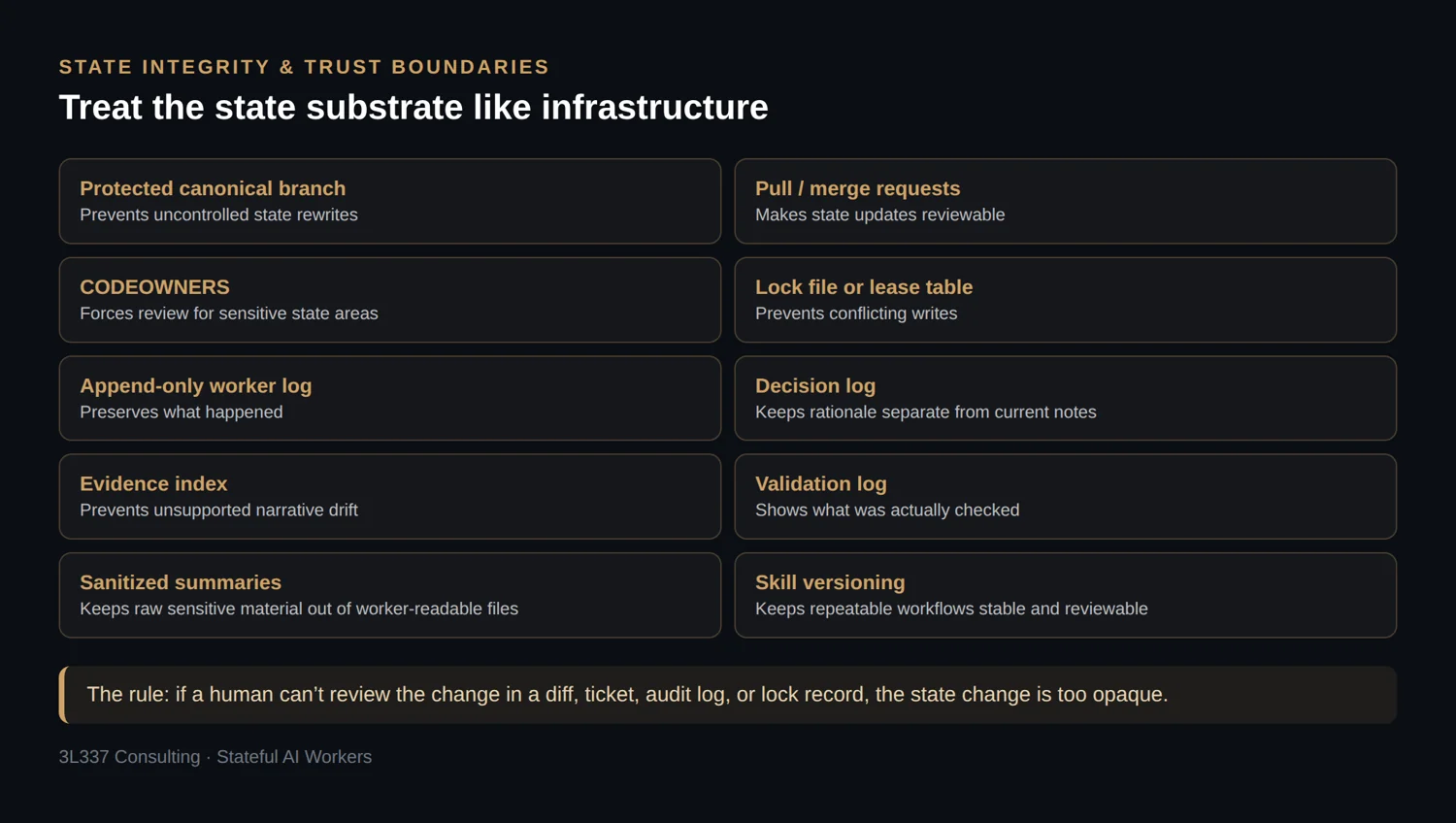
For security work, the separation between evidence, narrative, findings, and report skin matters. Evidence proves. Narrative explains. Findings classify. Report skin controls presentation. Current state tracks continuity. Mixing those layers makes later review harder and increases the chance that a worker treats an unverified note as proven fact.
A practical rule:
If a human cannot review the state change in a diff, ticket, audit log, or lock record, the state change is too opaque.
13. Anti-patterns
The failures are predictable.
| Anti-pattern | Better pattern |
|---|---|
| “Continue from above.” | Rehydrate from durable state |
| One giant chat as project memory | Repository, case folder, or database state |
One massive AGENTS.md | Separate instructions, state, evidence, validation, and hand-off |
| Prompts stored only in old chats | Skills and versioned prompt fallbacks |
| Raw evidence mixed with summaries | Evidence index plus sanitized notes |
| No task queue | Issue/ticket queue or task_queue.md |
| No lock tracking | File, task, branch, or database locks |
| No validation log | Required validation record |
| No review-only mode | Separate review-gate worker |
| Model memory treated as authoritative | External state is authoritative |
| Vector search treated as canonical state | Vector search as retrieval over canonical state |
| Every worker can edit everything | Role-based scope and review |
| State update as optional cleanup | State update as exit criteria |
The most damaging anti-pattern is relying on the operator to keep stitching context back together manually. That works until the project gets large, the team grows, the worker changes, or the thread loses enough context to affect outcomes.
14. Reference implementation for stateful AI workers
Download the files. Each file below can be downloaded on its own (the link is on its filename, just above each box), or grab the whole ai-state/ scaffold as one archive: stateful-ai-workers-starter.zip.
A small reference layout is enough to start:
ai-state/
  AGENTS.md
  CLAUDE.md
  README.md

  state/
    current_state.md
    task_queue.md
    decisions.md
    validation.md
    locks.md
    handoff.md
    worker_log.md

  .agents/
    skills/
      rehydrate/
        SKILL.md
      state-update/
        SKILL.md
        scripts/validate_state.py
      evidence-index/
        SKILL.md
        scripts/check_evidence_index.py
      review-gate/
        SKILL.md

  prompts/
    rehydrate-fallback.md
    review-export.md
    ad-hoc-analysis.md

  artifacts/
    evidence_index.csv
    manifest.json

  reports/
    narrative.md
    output_notes.md
A minimal AGENTS.md:
# Worker Instructions

## Operating Model

This project uses externalized state. Do not rely on chat history as the source of truth.

Before task work:
1. Read state/current_state.md.
2. Read state/task_queue.md.
3. Read state/decisions.md.
4. Read state/validation.md.
5. Read state/locks.md.
6. Read state/handoff.md.
7. Load any applicable skills.
8. Summarize the current operating picture.
9. Stop if state is contradictory, stale, or locked by another owner.

During task work:
1. Stay inside the assigned task boundary.
2. Preserve evidence links.
3. Do not invent project facts.
4. Do not rewrite decisions unless the task explicitly requires it.
5. Modify only files or sections in scope.

After task work:
1. Run required validation.
2. Update state/current_state.md.
3. Update state/task_queue.md.
4. Update state/validation.md.
5. Update state/handoff.md.
6. Update evidence indexes if artifacts changed.
7. Release locks.
8. Record modified files and artifacts.
A minimal state/current_state.md:
# Current State

## Objective

## Active Workstream

## Current Task

## Last Completed Work

## Known Blockers

## Active Locks

## Current Evidence

## Current Narrative Status

## Validation Requirements

## Next Recommended Action
A minimal state/decisions.md:
# Decision Log

## Format

| Field | Description |
|---|---|
| Date | UTC date of the decision |
| Decision | What was decided |
| Rationale | Why this decision was made |
| Alternatives | Options considered |
| Impact | What this changes |
| Revisit condition | When this decision should be reconsidered |

## Decisions
A minimal artifacts/evidence_index.csv:
artifact_id,path,type,source,collection_time,purpose,sensitivity,related_task,notes
A minimal end-of-run checklist:
Start of run:
  Read instructions.
  Load applicable skills.
  Rehydrate from state.
  Check locks.
  Summarize loaded context.
  Confirm the next task.

During run:
  Work only inside the authorized task boundary.
  Record artifacts.
  Preserve evidence links.
  Keep decisions separate from observations.

End of run:
  Run validation.
  Update current state.
  Update task queue.
  Update evidence index.
  Update validation notes.
  Write hand-off.
  Release locks.
This is the entire pattern in operational form. It is not complicated, but it does require discipline.
Insights and Recommendations
For most teams, Git-backed Markdown is enough to start. Markdown is human-readable, model-readable, reviewable, diffable, and portable. CSV, JSON, and YAML work well for indexes, manifests, and structured state. GitHub Issues, GitLab Issues, Jira, Linear, or another ticketing system can hold the task queue. Object storage can hold large evidence. A database can track async workers and lock leases. MCP can expose external systems when a worker needs controlled access to files, tools, databases, or workflows.
Keep the layers separate. Worker instructions, current state, decisions, evidence, validation, narrative, skills, prompt fallbacks, locks, and hand-off notes each deserve their own place. When those layers collapse into one file or one thread, the project becomes harder to review and easier to corrupt.
Use skills for repeatable procedures. Rehydration, state updates, evidence indexing, review gates, finding normalization, and report narrative updates are better expressed as skills or versioned runbooks than as prompts copied from old chats. Keep prompt snippets for one-off actions, cross-tool fallbacks, and temporary review exports.
Split implementation from review. A worker that performs a task can miss its own drift, especially if the task is complex or the state is large. A separate review worker, rehydrated from the same state, can evaluate the result against the objective, evidence, validation notes, locks, and scope boundaries.
Make state updates non-negotiable. The final act of a worker is not producing the immediate answer. The final act is leaving the workspace in a state where another worker or teammate can continue without needing the prior chat.
Conclusion
Stateful AI workers do not require stateful models. It requires a stateful work substrate.
The durable unit is not the chat. It is the project, case, engagement, or workflow. Once that work carries its own state, the worker becomes replaceable.
One worker can start the task. Another can continue it. A third can review it. A teammate can join the project without inheriting a private chat thread. An async worker can pick up a task later because the task state, evidence, lock status, and validation rules are available outside the model.
The teams that get durable value from AI workers will not be the teams that keep everything in one endless conversation. They will be the teams that make the work portable.
The model changes. The worker changes. The team changes. The work continues.
Key Takeaways
| Takeaway | Practical meaning |
|---|---|
| AI workers do not need persistent model memory to perform persistent work | The external state substrate carries continuity |
| Rehydration is the bootstrap process | Every worker should reload state before acting |
| This is not just for coding | It applies to pentesting, reporting, review, investigations, research, compliance, and async workflows |
| Instruction files are adapters | AGENTS.md, CLAUDE.md, and repository instructions guide behavior but should not hold all state |
| Team use requires lock control | Track ownership through branches, issues, lock files, leases, or review gates |
| Multi-model work becomes practical when the work can explain itself | The project, not the chat, becomes the source of truth |
References
[1] OpenAI, “Conversation state.” https://developers.openai.com/api/docs/guides/conversation-state
[2] OpenAI Codex, “Custom instructions with AGENTS.md.” https://developers.openai.com/codex/guides/agents-md
[3] Anthropic, “How Claude remembers your project.” https://docs.anthropic.com/en/docs/claude-code/memory
[4] GitHub Docs, “Adding repository custom instructions for GitHub Copilot.” https://docs.github.com/en/copilot/customizing-copilot/adding-repository-custom-instructions-for-github-copilot
[5] Model Context Protocol, “What is the Model Context Protocol?” https://modelcontextprotocol.io/docs/getting-started/intro
[6] OpenAI, “Skills.” https://developers.openai.com/api/docs/guides/tools-skills
[7] OpenAI Codex, “Agent Skills.” https://developers.openai.com/codex/skills